ICS Calendar

ICS Calendar
  • Features
    • ICS Calendar Pro
    • Feature Comparison
    • Sample Calendars
    • Preview Your Calendar
    • More WordPress Plugins
  • Help
    • User Guide
      • Quick Start Guide
      • Getting Started
      • General WordPress Settings
      • ICS Calendar Settings
      • Shortcode Overview
      • Shortcode Reference
      • FAQs and Tips
      • CSS Guide
      • Developer Resources
      • GDPR
    • Pro Documentation
      • Calendar Builder
      • ICS Events
      • Manual Calendar Setup
      • Admin Utilities and Settings
      • Customizer
      • Block Editor
      • Parameters Reference
    • Shortcode Builder
    • Support Request Form
    • Translation Suggestions
  • Blog
    • Changelogs
      • ICS Calendar
      • ICS Calendar Pro
  • Download
    • ICS Calendar Pro
    • ICS Calendar (free)
  • Cart
  • My Account
Search
More...

ICS Calendar Pro version 6 is coming!

 
✓ New Appearance tool to customize colors and fonts in your calendars
✓ New ICS Calendar Pro block for the Block Editor
✓ Plus dozens of enhancements and refinements throughout
✓ Additional features planned for versions 6.1 and 6.2 in early 2026

ICS Calendar Pro version 6.0 is slated for release in December 2025.

Be ready to get access as soon as it’s available by purchasing your ICS Calendar Pro license now!
Use the coupon code WAITINGFOR6 at checkout to get 10% off any license… even Developer!

This code is only valid through December 31, 2025, so don’t wait…

Get ICS Calendar Pro Today!

Coupon is not applicable for annual license renewals.

Dismiss Message

User Guide

  • Quick Start Guide
  • Getting Started
  • General WordPress Settings
  • ICS Calendar Settings
  • Shortcode Overview
  • Shortcode Reference
  • FAQs and Tips
  • CSS Guide
  • Developer Resources
  • GDPR

More Help

  • User Guide
  • Shortcode Builder
  • Pro Documentation
  • Support Request Form
  • Translation Suggestions

Using the Inspector

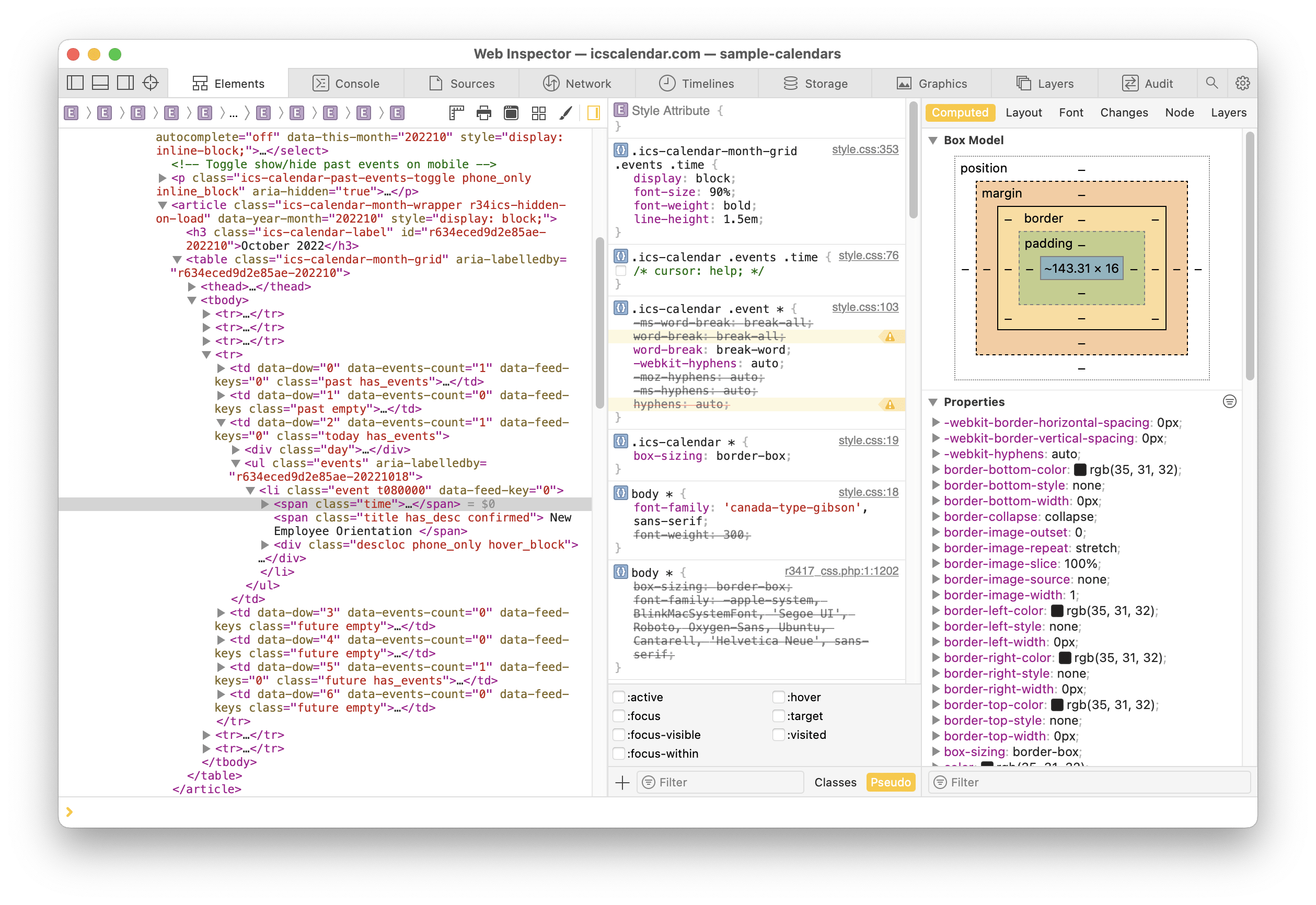
Get to know the “inspector” in your web browser. It’s a great way to see how the CSS of the plugin is constructed, so you can choose the proper selectors for the elements you want to modify.

To use the inspector, right-click (on Mac, Ctrl-click) on the element on a web page that you want to inspect, then choose “Inspect” (or similar; the exact label varies by browser) from the pop-up menu that appears. This will present the HTML of the page, with the selected element highlighted, along with a breakdown of all of the various CSS selectors that are being applied to that element.

Find a selector that begins with .ics-calendar and that is generally the one you need to use to write your own custom CSS for the element.

The screenshot below shows the inspector in Safari on the Mac, inspecting the CSS that’s applied to the time for an event in ICS Calendar. (Click the image for a close-up view.)

You can see that the CSS selector that you would want to use to modify the appearance of the time is: .ics-calendar-month-grid .events. time
Room 34 Creative Services, LLC

  • Facebook
  • YouTube
  • Bandcamp
  • Room 34 Creative Services, LLC
  • Minneapolis, Minnesota 55406 USA
  • info@icscalendar.com
  • More WordPress Plugins
  • Privacy Policy
  • Terms & Conditions

Copyright © 2025 Room 34 Creative Services, LLC. All rights reserved.
"ICS Calendar", "ICS Calendar Pro", "ICS Events", the ICS Calendar logo and ICS icon are trademarks of Room 34 Creative Services, LLC.
All screenshots are accurate at the time they are taken; features and layouts are subject to change without notice.

https://icscalendar.com/using-the-inspector